1. FES 310™, Front Panel, and LCD Display – Lesson/Quiz
Note: The following content corresponds with pages 1 through 11 of the manual.
Front Panel
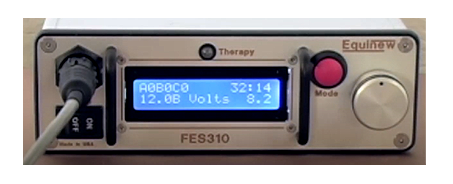
- Cable Connection is where you plug the cable into the system.
- Therapy Light turns on when the stimulus is active; increase the voltage while the light is on for smoother contractions.
- Mode Button (red) switches from Time Mode to Treatment Mode, allowing you to adjust settings with the Control Knob.
Note: Press the red Mode Button or the ON/OFF Switch to stop therapy. - ON/OFF Switch powers the unit ON and OFF and can also stop the therapy.
- LCD Panel displays treatment settings.
- Control Knob adjusts treatment time and intensity with its tactile dial.
LCD Display
The LCD display panel on this device is split into two rows. On the top row, you’ll find the electrode conductivity feature that shows the contact values for three electrode pairs labeled A, B, and C. Ideally, these values should match when the contact is equal, though a variation of one number is acceptable. This row also includes a countdown timer for the treatment duration. The bottom row displays the battery voltage, which decreases over time to show the remaining battery charge. Additionally, it tracks the therapy voltage, where the amplitude of the voltage increases by 0.2 volts every time you adjust the control knob.
Quiz Notes:
The short practice knowledge quiz that follows is based on the information provided here and in your manual. This quiz is timed but not graded. Each question must be answered before advancing to the next question.
Note: Some of the questions in this quiz will also be included on the final Exam at the end of the course.